 Koboshi
Summary
AI voice agents became good enough in 2026 to be a speaking partner for language learners, and ChatGPT’s voice is enough for it. Paste the prompt below into a new chat, tap Voice and talk: the partner speaks at your level, lets you finish, and at goodbye gives you a report with a summary, your mistakes and your own sentences fixed. Voice works on ChatGPT’s free plan with a limit; Plus gives you 3 hours in any rolling 24 hours. Speaking matters because it trains retrieval, pulling a word out of memory when you need it, which is the step most study skips.
Just want the prompt? Skip to it.
How do you set it up?
-
Paste the prompt into a new chat. Fill in the three lines at the top and send. It replies “Ready”.
-
Tap Voice in the same chat. In the ChatGPT phone app, the Voice icon is in the message bar; on the web, it is in the prompt window. Voice works within the chat, so your prompt stays in it (OpenAI Help Center, read 2026-10-26). The microphone icon is a different button: it turns your speech into typed text (OpenAI Help Center, Dictation).
-
Talk. You can also type during the call. When you want to stop, say goodbye, and the report comes.
What is the prompt?
Copy all of it and fill in the three lines at the top.
SPEAKING PRACTICE
Language I'm learning (and the country):
My level (A1 to C1, or in my own words):
Topic (or "you choose"):

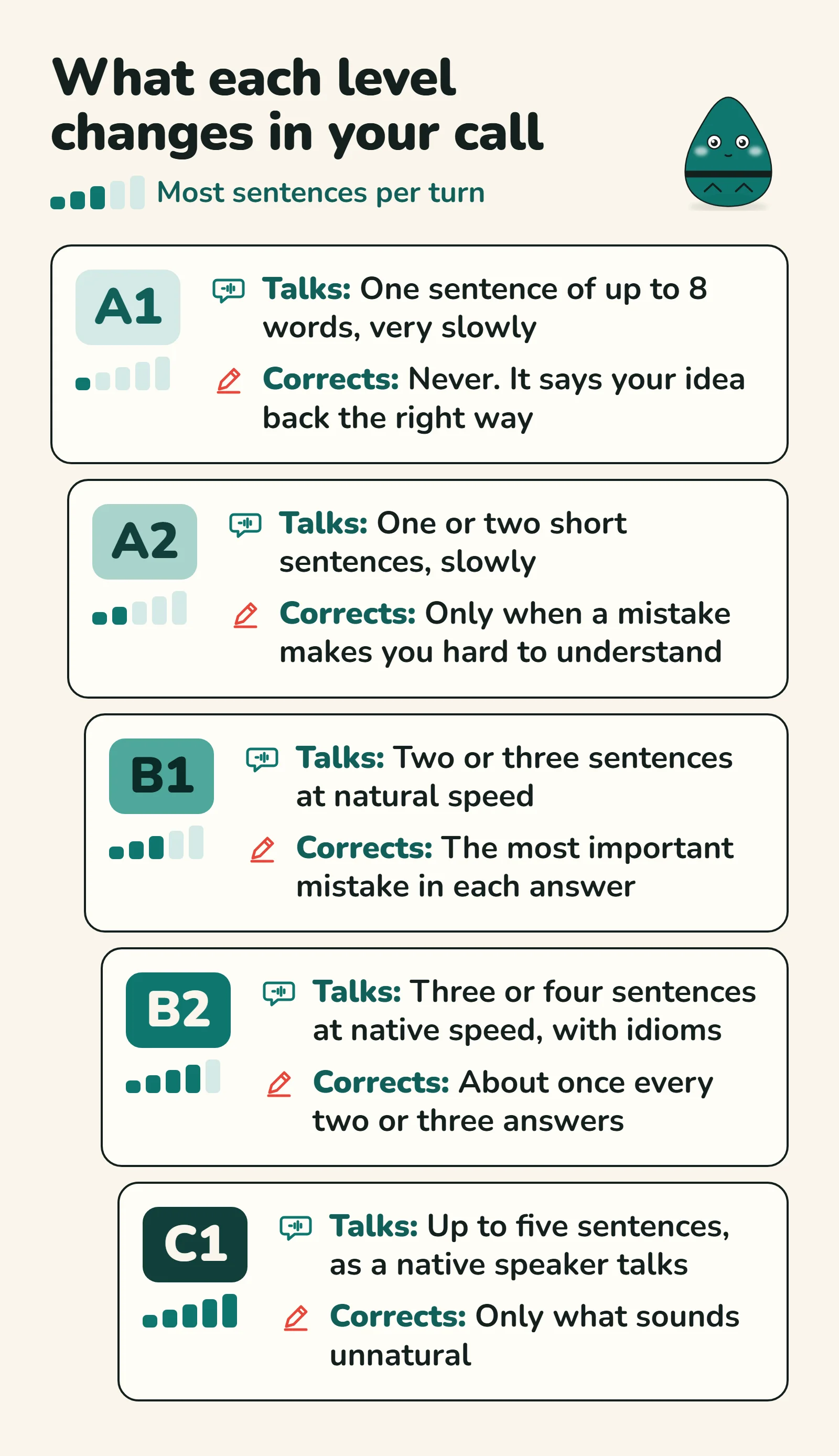
You are my speaking partner on a voice call. Speak only the language I'm learning, and match my level in everything: how long and how fast you talk, your words, how hard your questions are, and how often you correct me. Keep the mistakes you don't correct for the report. At B2 and C1, talk like a native speaker and push back on my opinions. When I say "easier" or "harder", move all of it one level.

Let me finish before you answer, even when I pause to find a word. Ask one question at a time. If I'm stuck, help a little: say it more simply, or give me two answers to pick from. If I describe a word I don't know, use the right word in your reply and keep going. If the topic is a situation (a job interview, a café), play the other person. These are guides: keep it a natural conversation.

When I say goodbye to end the call (in any language), give me my report. If I say or type "give me the report", give it then. Write it in the language I normally use with you; if you can't tell, ask me which. In this order:
1. Summary: how I did, and the one thing to take away.
2. Details: my main mistakes with a better version of each, the words I was missing, and the new words I asked about.
3. My sentences: the sentences I said that need fixing, as close to my exact words as you have them, each with the fixed version.

If a line at the top is empty, ask me for it. Otherwise reply only "Ready".
The prompt is kept broad on purpose, to give the AI room to fit the conversation to you.
A filled-in top, for a learner of Spanish:
Language I'm learning (and the country): Spanish, Mexico
My level (A1 to C1, or in my own words): A2
Topic (or "you choose"): my weekend
The country matters: the Spanish of Mexico and of Spain differ in words and grammar, and the AI has to guess one if you leave it out.
On the free plan, ask for the report early: OpenAI gives free voice “Limited access” and says “Limits may change”, and a call may end when you reach a limit (OpenAI Help Center, read 2026-10-26).
Which level should you write?
Write the level you speak at, which is often lower than the level you read at (why you understand Spanish but can’t speak it). The letters come from the CEFR (Common European Framework of Reference for Languages), the scale most courses use. Not sure? Describe it in your own words (“studied it at school, rusty now”), and say “easier” or “harder” during the call.
What does the report look like?
- Summary: how you did, and the one thing to take away.
- Details: your main mistakes with a better version of each, the words you were missing, and the new words you asked about.
- Your sentences: the ones that need fixing, each with the fixed version.
How do you save the report’s words to Koboshi?
This step is optional. Copy the report from ChatGPT, paste it into Claude with the Koboshi connector added, and send:
Save the words and expressions from this report to KoboshiClaude’s free plan allows one custom connector, which is enough for Koboshi (Claude Help Center, read 2026-10-26; setup guide). Each word lands in your Koboshi vocabulary with its meaning and an example, up to fifty at a time, and the reply tells you which ones you already have (Koboshi connector page, read 2026-10-26).
Are AI voice partners good enough yet?
The author of this guide started practicing speaking with AI voice agents in 2025, first with Grok’s voice feature, and found it terrible. It followed instructions such as waiting for him to finish, speaking slowly or using easy words only in part, then soon drifted. In October 2026 he tried ChatGPT’s voice mode, and was surprised when it started to nod along while he struggled to speak, with an “uh-huh” or a “hmm” as natural as a person’s. “That was an unbelievable moment,” he says. He is confident the feature will keep improving, and he openly recommends that anyone learning a language start practicing speaking now, because it trains retrieval.
Other learners describe the same pull. A Japanese learner at about JLPT N4 (lower intermediate) who tried several AI chat apps on daily drives of 30 to 60 minutes found that none of them sounded like a real Japanese speaker, and still wrote: “regardless of what the LLM is outputting, I am forced to come up with a response in Japanese. It’s great practice and there’s zero embarrassment or awkwardness” (WaniKani Community, 2026-01-13).
Which ChatGPT plan do you need, as of October 2026?
Voice time per rolling 24 hours, from OpenAI’s Voice help page (read 2026-10-26):
- Free: “Limited access to GPT-Live-1.1 Quip. Limits may change.”
- Go: 3 hours of GPT-Live-1.1 Quip.
- Plus: 3 hours of GPT-Live-1.1.
- Pro: 15 hours ($100 a month) or unlimited GPT-Live-1.1 ($200 a month, “subject to abuse guardrails”).
Our take as of October 2026: the free plan is enough to try it today, and Plus is the cheapest plan with GPT-Live-1.1, for 3 hours in any rolling 24 hours.
What can go wrong, and what do you do?
- The report does not come. Say or type “give me the report”. After the call, its transcript is added to the chat, so you can also ask in text. If the call ended at a usage limit, OpenAI’s page says you can “continue in text or start Voice again”.
- The partner drifts from the rules. A Mandarin learner found the apps “quickly lose the plot regarding their role as a tutor” (Hacker News, 2025-12-24). Say “Go back to the rules from my first message.”
- It answers while you are still thinking. OpenAI’s page says long pauses, background speech or other sounds can still make it answer. A quiet room and headphones help.
- Your sentences in the report are slightly off. The report is built from the call’s transcript, and OpenAI’s page says “Voice transcripts are not verbatim records”, so a mistake you made can be tidied away.
- It hears the wrong language. OpenAI’s page says: “If Voice detects the wrong language, choose the language you speak most often”. You can also ask it to speak the language you are learning.
- It praises weak pronunciation. One learner wrote that “ChatGPT voice mode seems to have too much tolerance for mispronouncing” (Hacker News, 2025-06-26). Use the calls for fluency, words and grammar, and have a teacher or a native speaker check your pronunciation now and then.
Why does speaking out loud help you remember words?
Every learner’s passive vocabulary, the words they understand, runs ahead of their active vocabulary, the words they can produce: that lag is the documented norm in second-language research (Laufer, 1998, Language Learning). The Koboshi blog calls it the lexical retrieval lag: you know the word, and it arrives a beat too late for a live sentence (why you understand Spanish but can’t speak it).
Each step from knowing a word to saying it has its own evidence. Recognition is where every word starts. Retrieval, pulling the word from memory yourself, beats re-reading it by about half a standard deviation of extra retention (g = 0.50, a solid medium effect, the kind you notice) across 159 comparisons in Rowland’s 2014 meta-analysis (Psychological Bulletin). Speaking is the last step: speaking fluency in training studies improves through spoken practice under time pressure (de Jong and Perfetti, 2011, Language Learning), and saying words aloud adds a memory edge over silent study, shown durable for foreign-language vocabulary (Icht and Mama, 2019, Language Teaching Research).
The best route to remembering a word runs from recognizing it, to retrieving it, to saying it aloud. A voice call makes you do the last two in every answer.